I wanted my agent to remember me across conversations. Not a flat key-value store of facts I’d curated by hand. A memory that reasons about what I say, builds a model of who I am, and keeps refining it over time. Honcho does exactly that. It’s the memory layer behind a growing list of agent frameworks, and it runs as a FastAPI server that processes conversations in the background and extracts durable conclusions about the people using it.
The clean path would have been to run it against the managed service. But I keep my homelab on my own hardware for a reason, and this was a chance to push that further: run Honcho self-hosted, on a Proxmox LXC, with a local GPU doing the embedding work. No cloud round-trip for the memory pipeline. No per-token surprise on the embedding calls. This post is the day-after writeup of how I got there: the parts that worked, the ones that fought back, and the decisions that mattered.
The architecture
Honcho splits into a few moving parts, and the official Docker Compose bundles them together:
- api is the FastAPI server on port 8000. This is what my agent talks to.
- deriver is a background worker that reads queued messages and does the reasoning: extracting observations, building peer representations, generating session summaries, and running “dream” consolidation.
- database is PostgreSQL with pgvector, where everything lands.
- redis is the cache and short-lived queue.
On top of that, Honcho needs an LLM for the reasoning (the deriver’s extraction and summaries) and an embedding model for the vector search over stored memories. The reasoning goes to one place, the embeddings to another, and that split is the part worth explaining.
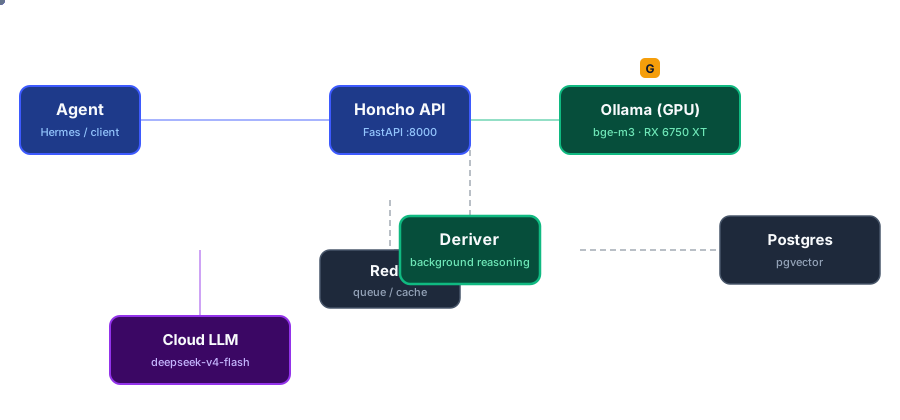
The agent talks to the Honcho API. The deriver reasons with a cloud LLM and stores results in Postgres. Embeddings run on a local GPU via Ollama.
Why the GPU matters at all
Honcho’s search is semantic. When my agent asks “what does Kerman work on?”, Honcho doesn’t grep for the string. It embeds the query and finds stored memories that are semantically close. That embedding step is a model call, and if you point it at a hosted API, every message you store and every search you run burns tokens on that provider.
I already use Ollama for my agent’s reasoning. But there’s a catch: Ollama Cloud doesn’t expose an embeddings endpoint. It serves chat models, and that’s it. So the reasoning could go to the cloud, but the embeddings had to be local. If I was going to run embeddings locally anyway, I might as well run them on the GPU. My node has an AMD RX 6750 XT sitting mostly idle, so that’s the route I took.
The LXC and the GPU passthrough
The setup lives on a Proxmox node. I created a dedicated LXC with Debian 13, Docker, and Compose. Simple enough. The interesting part is getting the GPU into the container.
Here’s the thing I want to flag early: GPU passthrough to an LXC is not the same as to a VM. For a VM you assign the PCI device directly (hostpci). For an LXC you don’t. You expose the device nodes, and the way to do that in Proxmox is the devN: syntax, not a raw mount.
My first attempt used lxc.mount.entry, and the container refused to start:
lxc-start: mount: /dev/dri: Can't lookup blockdev.
Proxmox treats a mount entry as a block device, but /dev/dri is a directory of char devices. It was the wrong tool for the job. The correct approach is the native device syntax, which tells Proxmox exactly what to create inside and how to map ownership:
# /etc/pve/lxc/<vmid>.conf
dev0: /dev/dri/card0,uid=0,gid=44,mode=0660
dev1: /dev/dri/renderD128,uid=0,gid=992,mode=0660
dev2: /dev/kfd,uid=0,gid=992,mode=0660
/dev/dri/renderD128 and /dev/kfd are the two nodes AMD’s ROCm stack needs. The gid values map to the video and render groups. This was the single most frustrating part of the whole setup, because a subtle mistake in the mount syntax silently produces a container that won’t boot. The log line doesn’t tell you it’s the GPU mount until you read it carefully.
The one that came back months later
There’s a trap here that I missed when I wrote this, and it bit me later. If the host has the GPU’s kernel driver blacklisted, the container fails to start with the same error you’d get from a bad mount:
Device /dev/dri/renderD128 does not exist
Nothing to do with the config. The device nodes simply aren’t on the host, because the driver that creates them never loaded. /dev/dri doesn’t exist at all, and the devN: lines point at nothing.
This is a VM/LXC mix-up, and it’s an easy one to make. To pass a GPU to a VM you hostpci the device and blacklist the driver on the host, so VFIO can claim it. Do that with an LXC and you’ve broken it, because an LXC does the opposite: it exposes device nodes, so the host must have the driver loaded to create them.
So check the host before you touch the container:
ls -la /dev/dri/ /dev/kfd
lsmod | grep amdgpu
If /dev/dri is missing, the problem is the host, not the LXC. Remove the blacklist and load the module:
rm /etc/modprobe.d/blacklist.conf   # after a backup
modprobe amdgpu
And then make it survive a reboot — this is the part that catches people. Deleting the blacklist is not enough: without it the module still doesn’t load on its own, because it isn’t in modules-load.d and the GPU shows up as a legacy endpoint, so udev never asks for it.
printf 'amdgpu\n' > /etc/modules-load.d/amdgpu.conf
One more detail that cost me an hour: don’t chase the GID. Inside the container render is 992, on the host it’s 993. They’re different on purpose and they don’t need to match — the gid= in the devN: line is the container’s. The mapping already works.
The GPU backend: not ROCm
With the devices inside, I installed Ollama in the LXC and pulled an embedding model. Then I checked whether it was actually using the GPU:
nomic-embed-text:latest 100% CPU
It showed 100% CPU. The whole point was the GPU. The reason is that the default Ollama build on this platform ships CUDA and Vulkan backends, but not ROCm. There’s no libggml-rocm.so in the install. Ollama fell back to CPU because it had no backend that knew how to talk to the card.
Two options: install the full ROCm runtime (which is heavy and fiddly inside a container), or use the Vulkan backend that ships with Ollama. The RX 6750 XT is RDNA2, and RADV (Mesa’s Vulkan driver for AMD) is excellent on these cards. I installed mesa-vulkan-drivers and vulkan-tools in the LXC:
apt install vulkan-tools mesa-vulkan-drivers
After that, vulkaninfo saw the card as it should:
GPU0:
  deviceName = AMD Radeon RX 6750 XT (RADV NAVI22)
  driverName = radv
And Ollama loaded the model onto the GPU:
nomic-embed-text:latest 100% GPU
That did it. No ROCm, no kernel modules to fight, just the Vulkan driver a package away.
Wiring Honcho’s embeddings to the local Ollama
Honcho reads its LLM configuration from a .env file, and each subsystem (the deriver, the summarizer, the dialectic reasoning, the embeddings) has its own model config block. I kept the reasoning on my existing cloud Ollama and pointed the embeddings at the local instance:
# Reasoning (deriver, summaries), cloud
DERIVER_MODEL_CONFIG__TRANSPORT=openai
DERIVER_MODEL_CONFIG__MODEL=deepseek-v4-flash
DERIVER_MODEL_CONFIG__OVERRIDES__BASE_URL=https://ollama.com/v1

# Embeddings, local GPU
EMBEDDING_MODEL_CONFIG__TRANSPORT=openai
EMBEDDING_MODEL_CONFIG__MODEL=bge-m3
EMBEDDING_MODEL_CONFIG__OVERRIDES__BASE_URL=http://192.168.1.X:11434/v1
EMBEDDING_VECTOR_DIMENSIONS=1024
EMBED_MESSAGES=true
Two details here cost me time.
The /v1 suffix. The OpenAI client Honcho uses appends /embeddings to the base URL. If I set the base URL to http://192.168.1.X:11434, without the /v1, the client called /embeddings, which doesn’t exist, and every embedding silently 404’d. The fix was a one-character path change.
The dimension mismatch. bge-m3 produces 1024-dimension vectors. Honcho’s default embedding config expected 1536. If you change the embedding model’s output dimension, you have to migrate the pgvector schema, or the API refuses to start:
docker run --rm --env-file .env --network honcho_default \
  -e DB_CONNECTION_URI="postgresql+psycopg://postgres:postgres@database:5432/postgres" \
  -w /app honcho-api /app/.venv/bin/python scripts/configure_embeddings.py --yes
That script aligns the database columns to the new dimension. Run it before you start the stack with the new model.
There’s also a flag worth setting for a personal setup: DERIVER_FLUSH_ENABLED=true. By default the deriver batches work. It waits for a session to accumulate enough tokens before building a representation, up to a maximum age. That’s fine for chat-heavy apps, but for a personal memory layer you want each message processed promptly. Flush mode bypasses the batching gate.
The network details that bite
Two network-level gotchas, because they always are.
Ollama listens on localhost by default. The Ollama service in the LXC bound to 127.0.0.1:11434, which means the Docker containers running Honcho couldn’t reach it. The fix is a systemd override that makes it listen on the interface:
# /etc/systemd/system/ollama.service.d/override.conf
[Service]
Environment="OLLAMA_HOST=0.0.0.0:11434"
And Honcho binds its API to localhost by default too. The compose file ships with 127.0.0.1:8000:8000, which is fine if the agent runs on the same box. Mine runs in a different LXC on the same bridge, so I changed the binding:
- "0.0.0.0:8000:8000"
Both are deliberate, sensible defaults. You don’t want a memory server exposing itself to the whole network by accident. But for a homelab with a couple of trusted containers talking to each other, you widen them deliberately.
Verifying the whole pipeline
The real test isn’t whether the server boots. It’s whether a message becomes searchable memory. I sent a message through the API, waited for the deriver to do its thing, and checked what landed in PostgreSQL:
kerman loves programming in Go
kerman is a Cloud Engineer in DevOps
kerman lives in Sopelana
Then the semantic search, asking a question that wasn’t in the stored text:
POST /v3/workspaces/hermes/search
{ "query": "where does kerman live and what does he do?" }
It returned the right memory. The embeddings on the GPU, the reasoning in the cloud, the whole loop working end to end.
What I took away
The setup cost is front-loaded, and it’s mostly about the GPU passthrough and the model wiring. Once it’s in place, the operational part is small. Honcho runs as Compose services that restart themselves, and the GPU does the embedding work locally.
Three things I’d tell myself before starting:
- Use the
devN:syntax for LXC GPU passthrough, notlxc.mount.entry. The latter fails silently with a confusing boot error. - For AMD on Ollama, Vulkan over ROCm in a container. One package install, no kernel modules, works out of the box on RDNA2.
- Check the embedding base URL and dimensions before you migrate. A missing
/v1and a stale vector dimension are the two silent killers.
Honcho is open source under AGPL-3.0, and the whole thing runs on hardware I already own. If you want an agent that actually remembers you, without shipping your conversations to a memory API, this is a clean way to own that stack.
The deployment lives as an Ansible playbook and the details are in the honcho-memory skill I use to manage it.